


Admin ADMIN
2026.08.11
 AdminBug reports 23Suggestions 4Exploits 0
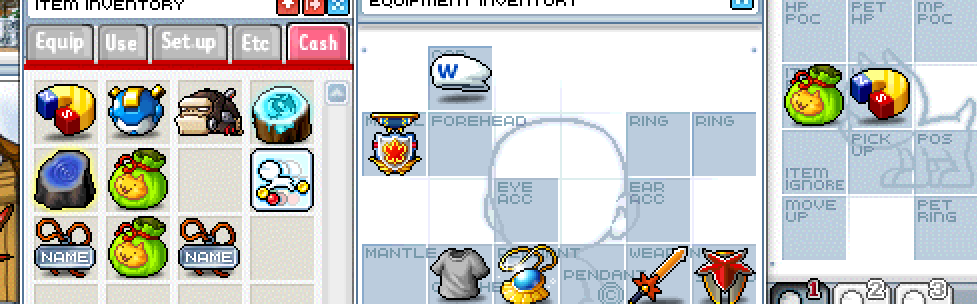
Confirmed, and your screenshot is exactly it — the Item Pouch and Meso Magnet are sitting in the pet window and in the Cash tab at the same time.
The cause: the pet slots were only ever bookkeeping. Fitting an item wrote its name into a slot but never actually took the item out of your bag, and taking it off just blanked the slot without giving anything back. In the real game these are ordinary equips — putting one on your pet moves it out of the inventory the same way a hat moves out when you wear it.
There are three places that need the same fix, and all three are in the patch: dragging an item onto the pet window, double-clicking it in the bag, and clicking a filled pet slot to take it off (that one has to hand the item back to the Cash tab, and refuse if the tab is full, so nothing can be destroyed).
One thing worth knowing while this is open: because the item never left your bag, nothing was duplicated permanently — you just had one item being drawn twice. After the fix it will show in one place only.
The cause: the pet slots were only ever bookkeeping. Fitting an item wrote its name into a slot but never actually took the item out of your bag, and taking it off just blanked the slot without giving anything back. In the real game these are ordinary equips — putting one on your pet moves it out of the inventory the same way a hat moves out when you wear it.
There are three places that need the same fix, and all three are in the patch: dragging an item onto the pet window, double-clicking it in the bag, and clicking a filled pet slot to take it off (that one has to hand the item back to the Cash tab, and refuse if the tab is full, so nothing can be destroyed).
One thing worth knowing while this is open: because the item never left your bag, nothing was duplicated permanently — you just had one item being drawn twice. After the fix it will show in one place only.