 AdminBug reports 23Suggestions 4Exploits 0
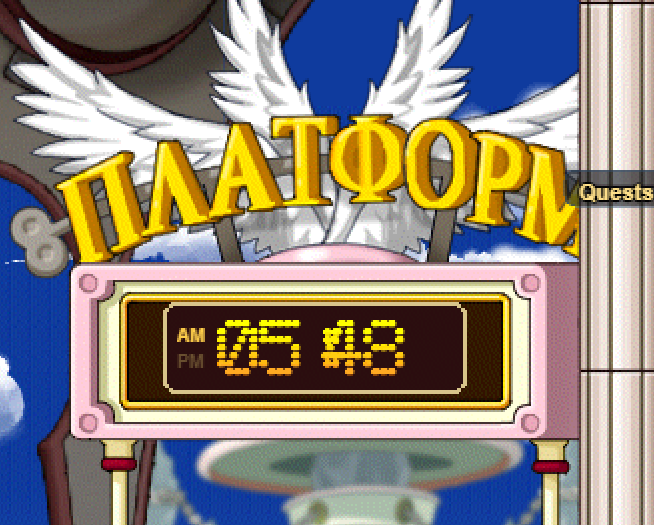
Confirmed, and John's reference shots nailed it — thank you both. The clock was showing the right time; it just wasn't drawing it in a readable place.
The digits are four separate 21-pixel images from the game files with a 9-pixel separator bar between them. The bar was being positioned as if it sat at the hundreds place rather than in the gap, which put it about 10 pixels too far right — right on top of the first minutes digit. That's why the third character in your screenshot is that smeared blob: it's a "4" with the separator bar printed through it. The hours and the last digit were fine, which is why it looked like a half-broken clock rather than a blank one.
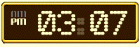
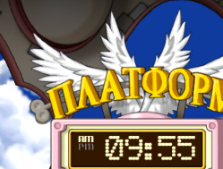
The fix moves the bar to the exact midpoint between the hours and the minutes, so it lands in the gap and touches neither digit — the layout in the two shots John posted (AM/PM stacked at the left, then 0 3 : 0 7).
On the other half of what was written down: I checked whether the clock agrees with the boat timetable. Departures are aligned to the epoch in UTC on a 15-minute cycle for the Ellinia/Orbis boats and 10 minutes for the trains and flights, while the clock reads your machine's local time. For anyone whose timezone is a whole number of hours off UTC the minutes are identical, so the clock and the timetable already agree — which is the part that matters for catching a boat. It only drifts for the half-hour and quarter-hour offset zones (India, parts of Australia, Nepal). Leaving that alone in this patch rather than silently changing the clock to UTC for everybody.
 test portal · help squash bugs