
HOMEFORUMSUPPORTDISCORD
★ TEST
✦ Welcome to the MapleVerse Test Portal! ✦  Found a bug? Report it here — paste a screenshot right from your clipboard! ✦  9 issues being tracked — thank you, testers! ✦✦ Welcome to the MapleVerse Test Portal! ✦  Found a bug? Report it here — paste a screenshot right from your clipboard! ✦  9 issues being tracked — thank you, testers! ✦
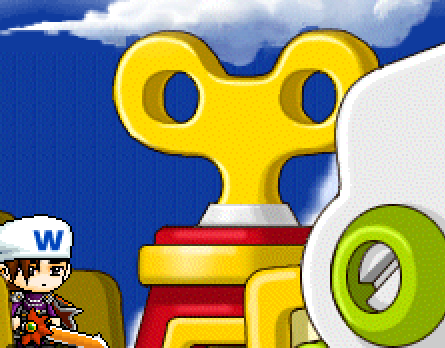
#201 the winding handle on the train to ludibrium and back to orbis glitch to the left every few rotations FIXED
LOW Graphics & Maps 🍄reported by Drew · 2026.08.09 · updated 2026.08.11
when riding the train to ludibrium and back the wind up handle at the top of the train glitches to the left and back every few rotations
screenshot 1
🍅 ME TOO · 0 Sign in to confirm this bug.
COMMENTS 2 replies
Admin ADMIN 2026.08.11

Confirmed — nice spotting, that is a subtle one.

The winding handle is an animated background object on the train map, and animated map objects play their frames from the game data with a per-frame delay. A jump 'to the left and back' every few rotations is the signature of the animation looping back to its first frame while the frames themselves have differing origins — so the last frame and the first frame do not line up, and you see a snap.

Not fixed yet; it needs the object's real frame origins read out of the map data and compared against how we are positioning each frame. Recorded so it is not lost.
Admin ADMIN 2026.08.11
Confirmed, and it's a real one — nice spotting, that handle turns fast.

The wind-up key on the toy train is a 10-frame animation. Frames 0 to 5 are actual pictures; frames 6 to 9 aren't pictures at all, they're shortcuts in the game data that say "re-use frames 1 to 4". Each real frame carries its own anchor point, because the key's art changes width as it rotates — but the shortcut frames carry only the pointer, no anchor. Our renderer, finding no anchor on a shortcut frame, fell back to frame 0's anchor.

That's the jump you saw. Frame 0's anchor is 68 pixels in; the frames being re-used want 53, 12, 53 and 68. So on the seventh frame of every cycle the key snaps 56 pixels to the left, on the sixth and eighth it snaps 15 pixels, and on the ninth it lands back where it belongs. The whole cycle is about two seconds, which is exactly your "every few rotations".

The fix makes a shortcut frame borrow the anchor from the frame it points at. It's not specific to the train — there are 180 of these shortcut frames across 13 object sets, so a handful of other animated scenery around the world should stop twitching too. The train maps are 200090100 (Orbis to Ludibrium) and 200090110 (the way back), which matches where you saw it.

Sign in with MSU to comment.