


SnailHunter ADMIN
4 days ago
Both halves fixed and shipped.
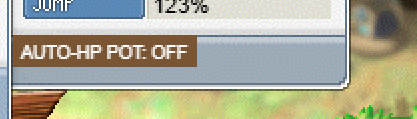
THE POSITION. I measured the real detail-wing art (Stat/backgrnd2, 177x203): its light interior ends at y171, y172-174 is the inner shadow, and y175 — which is exactly where that bar was being drawn — is the wing's own dark bottom frame line, with the border running on to y198. So it was painted onto the frame and hung past the window's bottom edge over the world. There are only about 4 clear pixels under the JUMP row, which cannot hold a 16px control, so the wing is simply not somewhere it can live. It moves to the main stat panel's footer band, which is flat and empty in the art and only carries the DETAIL button on its right.
THE "DOESN'T SAVE". Your setting was never lost — the label was. The button was constructed with the literal text "AUTO-HP POT: OFF" every single time the window was built, so closing and reopening showed OFF while the threshold on your character was still 30% or 50% and still firing. It now reads the live value when it draws.
One deliberate change that comes with the move: it is drawn whenever the stat window is open, not only when the DETAIL wing is out. A per-character setting belongs with the character sheet.
LIVE on the published build.
THE POSITION. I measured the real detail-wing art (Stat/backgrnd2, 177x203): its light interior ends at y171, y172-174 is the inner shadow, and y175 — which is exactly where that bar was being drawn — is the wing's own dark bottom frame line, with the border running on to y198. So it was painted onto the frame and hung past the window's bottom edge over the world. There are only about 4 clear pixels under the JUMP row, which cannot hold a 16px control, so the wing is simply not somewhere it can live. It moves to the main stat panel's footer band, which is flat and empty in the art and only carries the DETAIL button on its right.
THE "DOESN'T SAVE". Your setting was never lost — the label was. The button was constructed with the literal text "AUTO-HP POT: OFF" every single time the window was built, so closing and reopening showed OFF while the threshold on your character was still 30% or 50% and still firing. It now reads the live value when it draws.
One deliberate change that comes with the move: it is drawn whenever the stat window is open, not only when the DETAIL wing is out. A per-character setting belongs with the character sheet.
LIVE on the published build.