HOMEFORUMSUPPORTDISCORD
★ TEST
✦ Welcome to the MapleVerse Test Portal! ✦  Found a bug? Report it here — paste a screenshot right from your clipboard! ✦  9 issues being tracked — thank you, testers! ✦✦ Welcome to the MapleVerse Test Portal! ✦  Found a bug? Report it here — paste a screenshot right from your clipboard! ✦  9 issues being tracked — thank you, testers! ✦
#269 Mini map has multiple windows show up when I logged in FIXED
LOW UI & Windows 🍄reported by Sup3rSp4z · 2026.09.06 · updated 2026.09.15
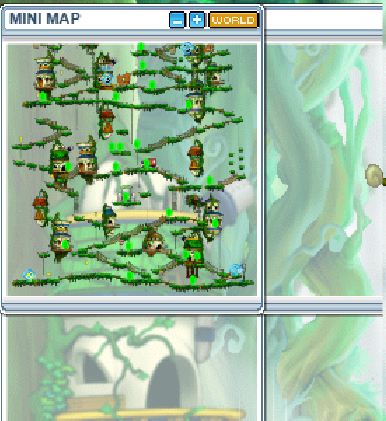
The mini map had multiple windows (see below) when I logged into ellinia. I'm on windows playing on chrome browser.
screenshot 1
🍅 ME TOO · 0 Sign in to confirm this bug.
COMMENTS 6 replies
Sup3rSp4z 2026.09.06
looks like it happens with more than just the minimap
screenshot 1
enigmaX 2026.09.08
Hello, just wanted to add, if your browser has a zoom more than 100%, it will send you to mobile version which still has these bugs AFAIK. Just unzoom to 100%, it will send you to the fixed desktop version.
Admin ADMIN 2026.09.08
Confirmed from your screenshot, and already fixed on the dev branch — your build predates the fix.

What you are seeing is one minimap window whose FRAME is drawn much larger than the map picture inside it. The old code sized the panel from the FULL minimap image (Ellinia's is 179x321) with no ceiling, so a tall or wide map produced a frame far bigger than anything it was showing, and the translucent body let the game world show through the empty part — which reads exactly like a second window stacked behind the first.

Fixed on develop on 4-5 Sep by the authentic v83 behaviour: the minimap is a BOUNDED window that crops the full-resolution map and scrolls it to keep you centred, instead of growing to fit. Four commits: the bounded scrolling window, the frame hugging its image, a hard clip on the scroll window, and the removal of an opaque backdrop.

Your report is dated after those landed, but the published game is only updated on an explicit publish, so you were still on the older build. Please re-test after the next publish - if it still happens, reopen and tell me your screen resolution setting (Options) and browser zoom percentage, and I will take it from there.

(Re: your follow-up that it happens with more than the minimap - the medal name plate in your shot is stretched wider than its text. That is a separate thing and I have NOT fixed it; if it survives the next publish please file it on its own so it does not get lost behind this one.)
Admin ADMIN 2026.09.09
CORRECTION — my previous reply was wrong and I am retracting it.

I told you this was already fixed on the dev branch and that your build simply predated the fix. The owner has since confirmed it is STILL happening after those changes, so that conclusion was wrong and I should not have closed it as fixed.

What I still stand behind is the measurement: the window FRAME is drawn much larger than the map picture inside it. What I got wrong was the cause. I had assumed the old uncapped panel sizing, but the current code caps the panel at roughly 252px wide for these maps and cannot produce the ~366px frame your screenshot shows. That means it is NOT one oversized window — it is a SECOND set of frame pieces left behind, i.e. a leaked minimap that was never torn down, drawing behind the live one. That also matches your own title ("multiple windows") and your follow-up that it happens with more than the minimap, both of which I under-weighted.

Back to CONFIRMED and actively being worked. Sorry for the premature close — you were right to keep pushing on it.
Admin ADMIN 2026.09.09
Update, and an apology for the back-and-forth on this one — this is the third reply and the first that comes with a measurement rather than a guess.

I have now found and fixed a real defect in the minimap sizing, by running the actual minimap code and reading the numbers off it instead of measuring pixels in a screenshot (which is what led both of my earlier replies astray — a browser-zoomed screenshot cannot be measured in absolute pixels, exactly as enigmaX pointed out above).

WHAT WAS WRONG. The panel was cropping every map to a fixed 240x180 window. That number was invented — the comment above it in the source literally said "ESTIMATE, not yet sourced" — and the four changes I made on 4-5 Sep were all refinements of that invention rather than a fix. Henesys ships a 465x86 minimap picture, so the panel was showing barely half the town; Ellinia's is 179x321, so it was cut off at 180 tall. Either way you get a frame that does not match the picture inside it.

WHAT v83 ACTUALLY DOES. The window is sized TO the map picture and draws all of it, centred: window_width = max(178, name_width, map_width + borders). No cropping, no scrolling. Henesys now renders its full 465px map in a 477px panel. I have verified this on four map shapes (a wide map, a very tall one, a tiny one, and the widest map in the game).

WHAT I HAVE NOT PROVEN. Your title says "multiple windows" and your follow-up says it happens with more than the minimap. The sizing fix explains a frame that is too big for its picture, and I think that is what you photographed — but it does not explain other windows doing it, so I am NOT closing this. If you still see doubled or oversized windows after the next build, please say so and post which map and what browser zoom you are at; that would tell me there is a second, separate problem and I will chase it on its own.

STATUS: fixed on the dev branch, NOT live yet. Nothing you can re-test until the next publish — I will flag it here when that goes out. Keeping this one in progress until you confirm in-world.

Admin ADMIN 2026.09.15
Live in the latest publish — marking this Fixed. Thanks for the report!

Sign in with MSU to comment.