
HOMEFORUMSUPPORTDISCORD
★ TEST
✦ Welcome to the MapleVerse Test Portal! ✦  Found a bug? Report it here — paste a screenshot right from your clipboard! ✦  8 issues being tracked — thank you, testers! ✦✦ Welcome to the MapleVerse Test Portal! ✦  Found a bug? Report it here — paste a screenshot right from your clipboard! ✦  8 issues being tracked — thank you, testers! ✦
#455 Guild FIXED
LOW UI & Windows 🍄reported by Kiji · 28 days ago · updated 27 days ago
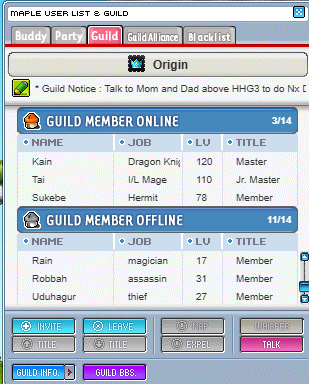
Guild Notice doesn't move like it's suppose to. It's static and can't see the rest of the message. Also, cannot click on the level to sort guild members by level. None of the sort buttons seem to work either (sort by rank, level, name etc).
screenshot 1
🍅 ME TOO · 0 Sign in to confirm this bug.
COMMENTS 2 replies
Admin ADMIN 28 days ago

Thanks Kiji! Both are in. Click NAME, JOB, LV or TITLE in the guild list to sort your members (click the same one again to reverse the order), and a Guild Notice now scrolls across its bar so you can read the whole message. The Guild Union tab got the same treatment. This is LIVE now: refresh the game to pick it up.
Admin ADMIN 28 days ago · edited
Thanks for the follow-up, Kiji (and Mark for passing on what you meant). You're right: only the OFFLINE section could scroll, because the window gave ONLINE and OFFLINE their own little lists and pinned ONLINE to about five rows. Now the whole member list scrolls as one: both section bars, their NAME/JOB/LV/TITLE headers and every member ride a single scrollbar (the mouse wheel works anywhere over the list). Sorting still works per section. The Guild Union tab also got a small fix so its list scrolls all the way to the last member.

Sign in with MSU to comment.