
HOMEFORUMSUPPORTDISCORD
★ TEST
✦ Welcome to the MapleVerse Test Portal! ✦  Found a bug? Report it here — paste a screenshot right from your clipboard! ✦  9 issues being tracked — thank you, testers! ✦✦ Welcome to the MapleVerse Test Portal! ✦  Found a bug? Report it here — paste a screenshot right from your clipboard! ✦  9 issues being tracked — thank you, testers! ✦
#499 Quick Import MSU FIXED
MEDIUM Gameplay reported by Tai · 24 days ago · updated 20 days ago
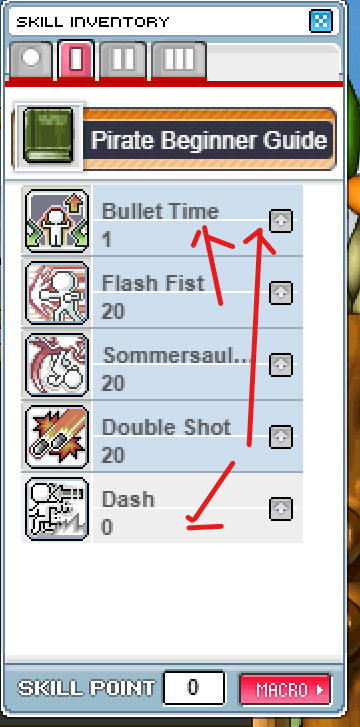
I quick imported a class. and let it pick my skills and stats.-.

It was soo off .-.

Maybe instead, if skill points >6 or AP>15 a max all option can popup?
or shift the up arrows up and put a max button underneath, so i can skill up fast without destroying my ap
screenshot 1
🍅 ME TOO · 0 Sign in to confirm this bug.
COMMENTS 4 replies
Admin ADMIN 24 days ago

Please give some specific details on the right order that would work automatically for every class, I thought about this and this was the best I could come up with
Admin ADMIN 21 days ago
Since this report the MSU quick import got a choice of how your AP is placed: Pure (all into your main stat) or Balanced, in the stat window and in Quick Setup. If skills are still landing in the wrong places, please post which class and level you imported and what you expected, as the owner asked - that tells us the order to use.
Tai 20 days ago
I don't think its possible with out planning out every class.

A better general rule would be "Passives" "buffs" "skills" but its very variable for different classes.
Like armour buff is not good, for any class.

I would recommend leaving it blank, but put it as a part of the quick setup and add a Max button to quickly fill out the skill list.
Admin ADMIN 20 days ago
Done, going with your suggestion - Quick Setup no longer spends your skill points at all; it still places your AP and puts learned skills on empty keys. Instead every skill in the Skill window now has a MAX button next to its + : one click puts in every point that skill can take right now. The + still adds one point, and Shift-click on + still asks how many. Live now - refresh the game to pick it up.

Sign in with MSU to comment.