
HOMEFORUMSUPPORTDISCORD
★ TEST
✦ Welcome to the MapleVerse Test Portal! ✦  Found a bug? Report it here — paste a screenshot right from your clipboard! ✦  9 issues being tracked — thank you, testers! ✦✦ Welcome to the MapleVerse Test Portal! ✦  Found a bug? Report it here — paste a screenshot right from your clipboard! ✦  9 issues being tracked — thank you, testers! ✦
#527 MiniMap Bug + Nice to have FIXED
MEDIUM UI & Windows reported by Tai · 23 days ago · updated 21 days ago
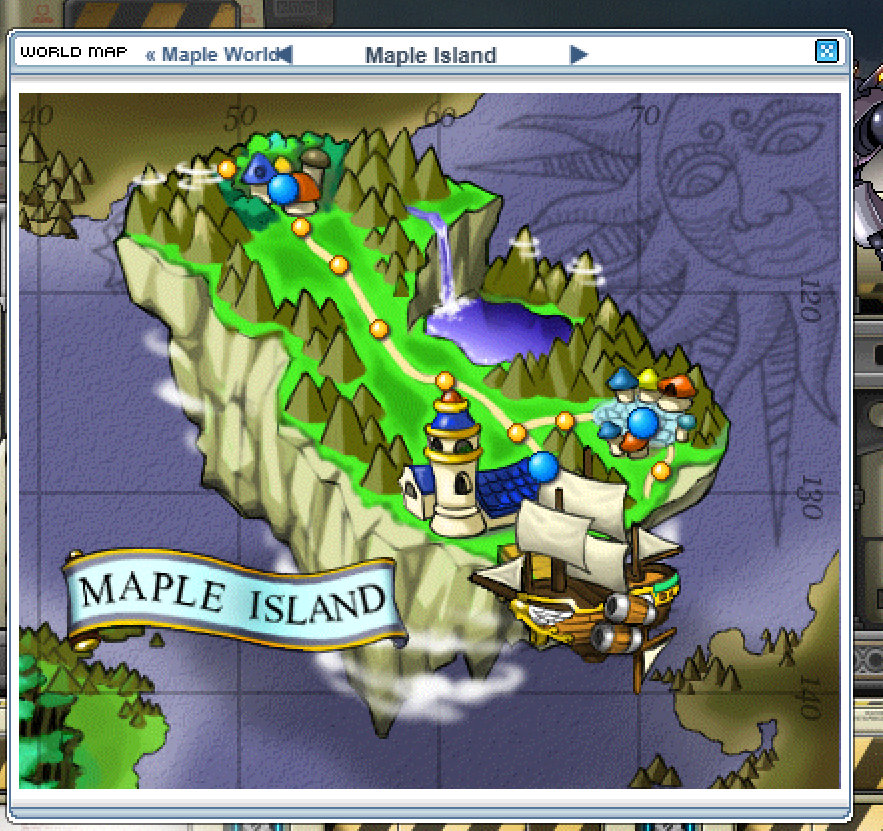
The Maple Island World Map view is smaller then the other defualt world maps, to the point that your mouse cant click the next < left arrow.

It also overmaps the "Maple World" shortcut so you cant continue scrolling left
(this would be solved by keeping the maple island map in the same size as the others. (if it loosk weird stretched, just pul a boarder around it and extend the size)


The Nice to Have.
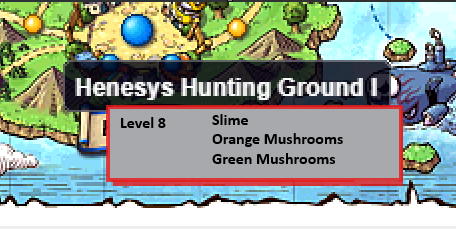
Could we get Basic Map information when hovering over the Map on the world map.
I.e recommended Level (or monster lvl) + Monster names, so it helps with navigation and knowing if its worth traveling too.
screenshot 1screenshot 2
🍅 ME TOO · 0 Sign in to confirm this bug.
COMMENTS 6 replies
Admin ADMIN 23 days ago

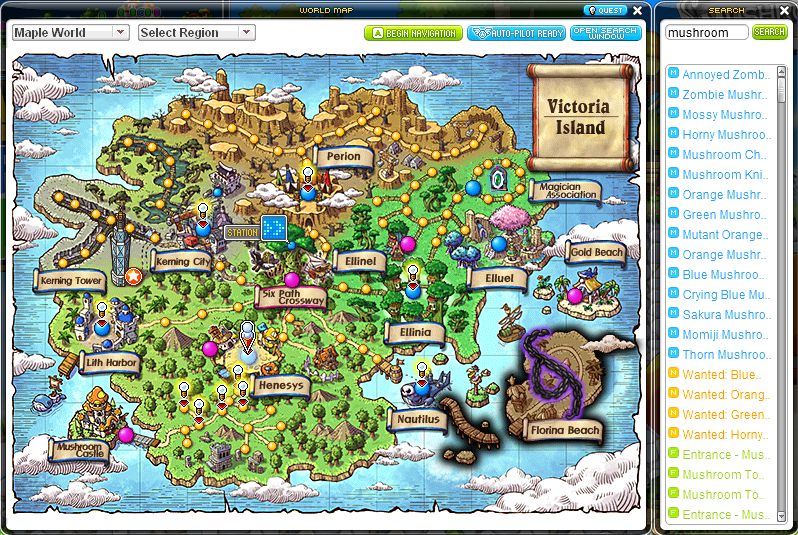
Let's add an info panel on the right side of the worldmap with monster search, item search, quest displays, info on each map section, make it advanced like our quest search and link it with our quest search. Also have it show what map is closest to the nearest hidden street when viewing hidden streets on the quest log.
Admin ADMIN 23 days ago
Kinda like this in general layout, but in the classic ui, and done much better with more info and useable features.
screenshot 1
chubby 23 days ago
Could you also make hidden streets show up in the map when you hover over it? Also when you click a hidden street location in quest log, the world map doesn't pop up so you have to search it's location online, which can be a hassle.
Admin ADMIN 23 days ago
Yes boggart, that's already part of the first suggestion "Also have it show what map is closest to the nearest hidden street when viewing hidden streets on the quest log."
Admin ADMIN 21 days ago
First part fixed: the Maple Island world map is now as wide as it needs to be - the painting sits centred in the frame, and the << Maple World link and the left arrow no longer overlap, so both can be clicked. The big info panel (monster / item / quest search, map info, nearest map for hidden streets) is a larger feature and is still to do - leaving this open for it.
Admin ADMIN 21 days ago
The big info panel is in. The World Map now has a MAP INFO panel on its right: hover or click any place and it shows the monsters there with their levels (and the level range), the NPCs, and the quests they give. Its Search tab finds monsters, items (by what drops them), quests (by who gives them) and places — click a result and the map jumps there. Hidden streets: opening one from the Quest Log now opens the World Map at the nearest map that's on it, and the panel says 'Hidden street — Nearest: <map> (N maps away)'.

Sign in with MSU to comment.