HOMEFORUMSUPPORTDISCORD
★ TEST
✦ Welcome to the MapleVerse Test Portal! ✦  Found a bug? Report it here — paste a screenshot right from your clipboard! ✦  9 issues being tracked — thank you, testers! ✦✦ Welcome to the MapleVerse Test Portal! ✦  Found a bug? Report it here — paste a screenshot right from your clipboard! ✦  9 issues being tracked — thank you, testers! ✦
#594 Legendary Spirit Skill FIXED
MEDIUM Combat & Skills reported by Tai · 17 days ago · updated 14 days ago
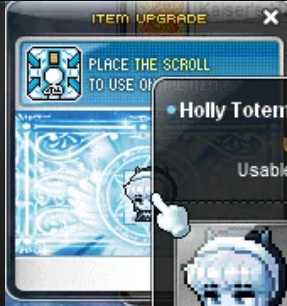
This is meant to make a pop-out window where you can put any item (even ones you cant wear)

This then allows you to scroll those items.
Currently it expected you to click on a scroll and scroll your inventory but that was not a thing for a much longer time.
screenshot 1
🍅 ME TOO · 0 Sign in to confirm this bug.
COMMENTS 3 replies
Admin ADMIN 14 days ago
Thanks - noted. In the version this game follows, Legendary Spirit has no pop-up window (the window list of that version has none for it, and the skill text says it lets you use scrolls on items in your inventory): you open the Equip tab, drop a scroll on it and pick the item. The pop-up window you describe came in a later version. We have passed it to Mark as a suggestion; nothing has changed yet.
Admin ADMIN 14 days ago · edited
You were right, and so is the window you remember. Legendary Spirit now opens its ITEM UPGRADE window, built the way the original client's own window works. To use it: cast Legendary Spirit and the window opens beside your item window. Drag any equip from your Equip tab into the middle of the window. That includes gear your character can't wear, and pet equipment from the Cash tab. Then drop the scroll you want onto the window. If you carry a White Scroll, the "Use White Scroll" box starts ticked; untick it to save the White Scroll. The window plays its effect, then the result appears in chat. On a success or a normal fail it stays open on the same item, ready for the next scroll. If a dark scroll destroys the item, the window closes. Correction to my earlier reply: this window does belong to the version we follow, and it's now the only way Legendary Spirit works. Dropping a scroll on the Equip tab no longer does anything. This is built and tested but not live yet. It goes out with the next update, and I'll mark this fixed then. When it's live, please try: a plain scroll on an unequipped item, the White Scroll box, and a dark scroll on something you don't mind losing.

Admin ADMIN 14 days ago
This is live now. Refresh the game (or accept the update notice) to get it. Then cast Legendary Spirit: the Item Upgrade window opens next to your item window. Drag an equip into the middle of it, drop a scroll on it, and the result shows in chat. Please let us know here if anything about the window looks or behaves differently from how you remember it.

Sign in with MSU to comment.