
HOMEFORUMSUPPORTDISCORD
★ TEST
✦ Welcome to the MapleVerse Test Portal! ✦  Found a bug? Report it here — paste a screenshot right from your clipboard! ✦  9 issues being tracked — thank you, testers! ✦✦ Welcome to the MapleVerse Test Portal! ✦  Found a bug? Report it here — paste a screenshot right from your clipboard! ✦  9 issues being tracked — thank you, testers! ✦
#638 Keyboard Settings - Interaction FIXED
LOW UI & Windows reported by Tai · 13 days ago · updated 12 days ago
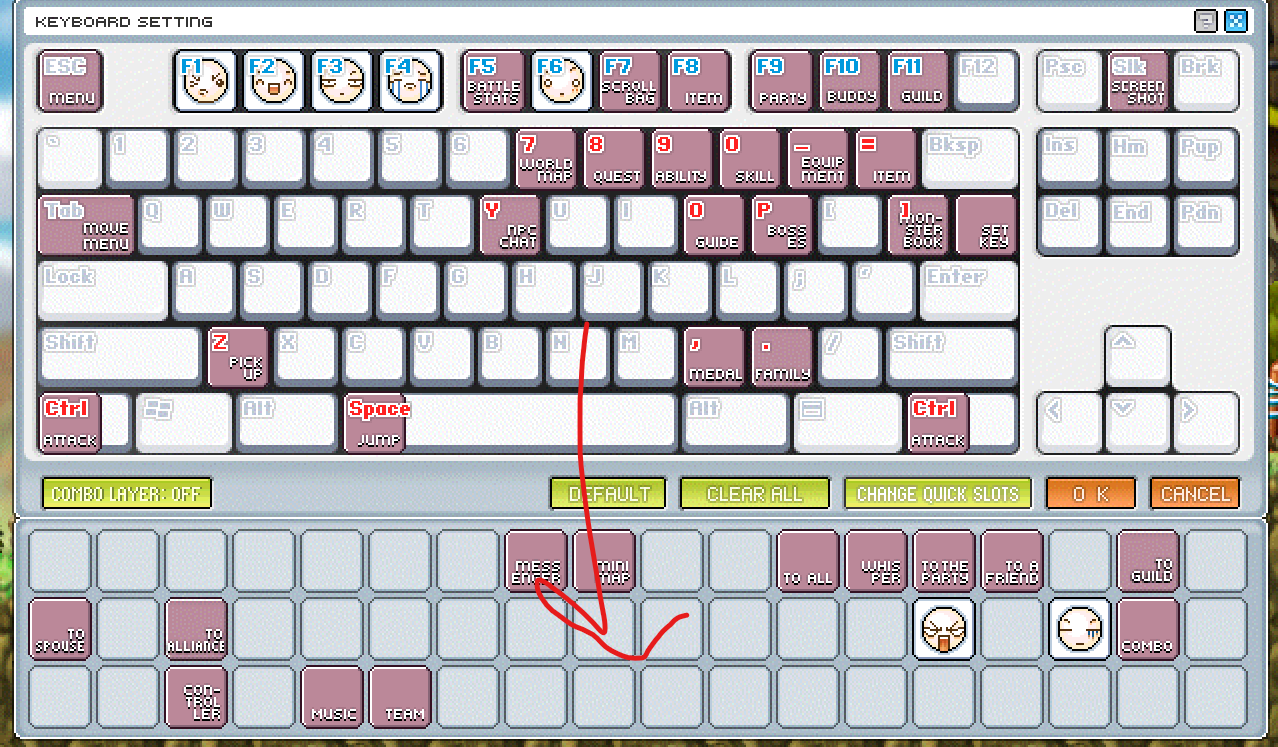
Right clicking keyobard hotkeys should remove them from their binding and send to the bottom.
screenshot 1
🍅 ME TOO · 0 Sign in to confirm this bug.
COMMENTS 2 replies
Admin ADMIN 13 days ago · edited

Thanks tai, good idea. The original Keyboard Settings window ignores right-click; you clear a key there by dragging its icon off the keyboard. We liked your suggestion, so we're adding it: right-clicking a key will clear it and send its icon back to the tray at the bottom, and dragging will still work too. We'll mark this fixed once it's in the game.
Admin ADMIN 12 days ago
This is in now: right-click a key in Keyboard Settings to clear it, and its icon goes back to the tray at the bottom. Dragging it off the keyboard still works too. Thanks for the suggestion, tai!

Sign in with MSU to comment.