
HOMEFORUMSUPPORTDISCORD
★ TEST
✦ Welcome to the MapleVerse Test Portal! ✦  Found a bug? Report it here — paste a screenshot right from your clipboard! ✦  9 issues being tracked — thank you, testers! ✦✦ Welcome to the MapleVerse Test Portal! ✦  Found a bug? Report it here — paste a screenshot right from your clipboard! ✦  9 issues being tracked — thank you, testers! ✦
#812 Finder for mobs and npcs FIXED
LOW Monsters & NPCs reported by chubby · 6 days ago · updated 6 days ago
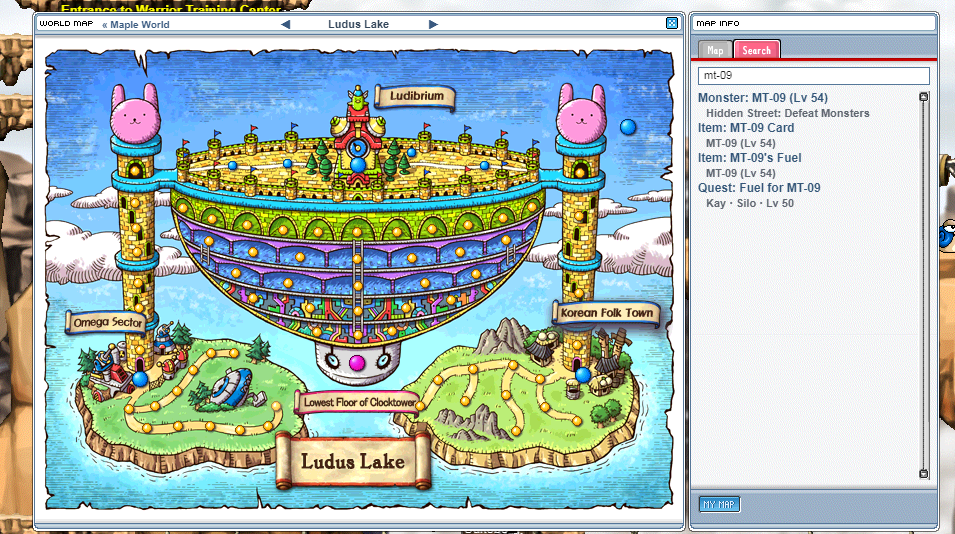
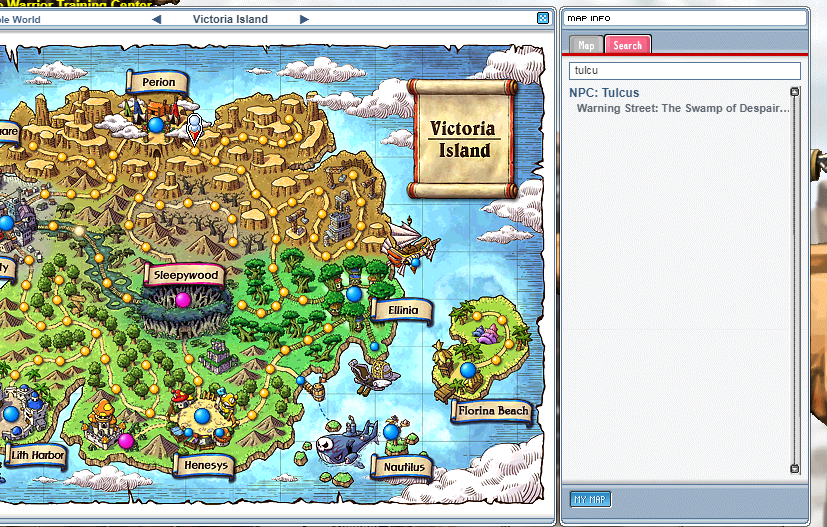
When I search mt-09 in the world map, it highlights the map Boswell Field VI. But mt-09s only exist in a hidden street in that map. I wanna be able to find them as if I'm on a quest to hunt them, with the finder arrow above my head.

Could you add a finder button next to each Monster/Npc entry to activate the finder in map info?
screenshot 1screenshot 2
🍅 ME TOO · 0 Sign in to confirm this bug.
COMMENTS 2 replies
Mark ADMIN 6 days ago
Thanks chubby, a finder button in the Map Info's monster and NPC list is a nice idea. It's a new feature, so it's with the owner to decide. Leaving this open until we have an answer.
Mark ADMIN 6 days ago
The owner said yes, and it's in! Open the World Map; in the Map Info panel on the right, every monster and NPC (on the Map tab and in Search results) now has a Find link. Click it and the arrow over your head leads you there: for a monster, the nearest map it lives on, hidden streets included (so mt-09 takes you into its hidden street). It works even with the quest arrow switched off. Click Stop to end it; for an NPC it ends when you reach them.

Sign in with MSU to comment.