
HOMEFORUMSUPPORTDISCORD
★ TEST
✦ Welcome to the MapleVerse Test Portal! ✦  Found a bug? Report it here — paste a screenshot right from your clipboard! ✦  9 issues being tracked — thank you, testers! ✦✦ Welcome to the MapleVerse Test Portal! ✦  Found a bug? Report it here — paste a screenshot right from your clipboard! ✦  9 issues being tracked — thank you, testers! ✦
#878 No way to use item link in note FIXED
LOW UI & Windows reported by chubby · 2 days ago · updated 6 hr ago
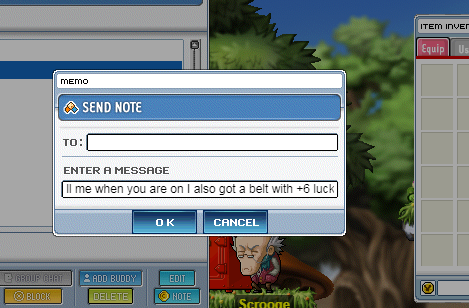
The text box is too small. And when typing in the memo window, the other parts are all dimmed. I can't even hover over items to check their tooltips. Let alone sending item links. This is unusable for a cash shop item.
screenshot 1
🍅 ME TOO · 0 Sign in to confirm this bug.
COMMENTS 1 reply
Mark ADMIN 6 hr ago
Thanks chubby. Two of your three points were a real fault: the Send Note window dimmed the whole screen and swallowed every click outside it, so items showed no tooltip and could not be linked. It no longer dims anything, tooltips show as normal, and clicking elsewhere no longer closes the note or loses your text. To link an item, hold Shift and click it in your bag while the note is open; its name drops into the message. The size of the text box is the original Pre-BB note window, so that part stays; a longer message scrolls inside the box (up to 200 characters).

Sign in with MSU to comment.