
HOMEFORUMSUPPORTDISCORD
★ TEST
✦ Welcome to the MapleVerse Test Portal! ✦  Found a bug? Report it here — paste a screenshot right from your clipboard! ✦  9 issues being tracked — thank you, testers! ✦✦ Welcome to the MapleVerse Test Portal! ✦  Found a bug? Report it here — paste a screenshot right from your clipboard! ✦  9 issues being tracked — thank you, testers! ✦
#88 inventory expantions should show a hover text with a semi transparrent black background showing the price of upgrade FIXED
CRITICAL UI & Windows 🍄reported by Drew · 2026.08.06 · updated 2026.08.06
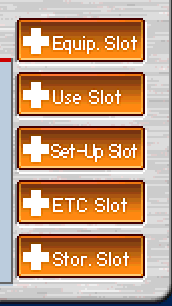
when you hover over each of the expantion options for inventory in the bottom left corner of the vx shop it should show a text that pops up with a semi transparrent black background behind the text showing the price of the upgrade the mouse is hovering over that way people can see how much they cost instead of guessing
screenshot 1
🍅 ME TOO · 0 Sign in to confirm this bug.
COMMENTS 2 replies
Admin ADMIN 2026.08.06

Confirmed - cause found, patch not written yet.

Those five expansion buttons simply have no hover handler. The tooltip support already exists, it was never wired to them.

Moving it out of OPEN so the list reflects reality: this one is pinned down to exact files and lines, so what is left is writing and testing the change, not working out what is wrong.
Admin ADMIN 2026.08.06
Fixed in 8f676114.

Cause: not a rendering bug - a missing wire. The click helper has always accepted optional hover and un-hover callbacks, and every item plate and inventory cell passes them, but the slot-expansion buttons called the shorter version without them. So nothing happened on hover and the price stayed invisible until you clicked and read the confirm dialog. Since those buttons also draw in their 'disabled' face when you cannot afford one, 'it doesn't work' was a fair reading.

Fix: two things on hover, both already sitting unused in the bundled art:
- The WZ's own mouseOver frame. All five buttons ship normal / pressed / disabled / mouseOver at 64x22, and only normal and disabled were ever drawn.
- The price, in a tooltip on the semi-transparent black panel, as you asked.

Retest: hover each of the five expansion buttons across the inventory tabs, including with too few Vesos to afford one.

Sign in with MSU to comment.