
HOMEFORUMSUPPORTDISCORD
★ TEST
✦ Welcome to the MapleVerse Test Portal! ✦  Found a bug? Report it here — paste a screenshot right from your clipboard! ✦  8 issues being tracked — thank you, testers! ✦✦ Welcome to the MapleVerse Test Portal! ✦  Found a bug? Report it here — paste a screenshot right from your clipboard! ✦  8 issues being tracked — thank you, testers! ✦
#914 Keyboard - Position FIXED
LOW UI & Windows reported by Tai · 16 hr ago · updated 3 hr ago
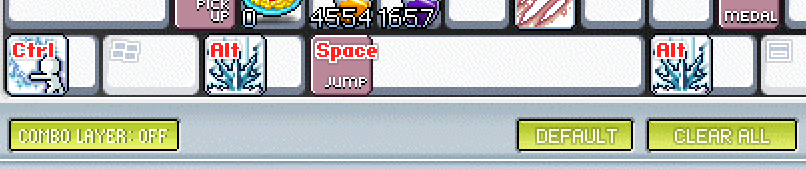
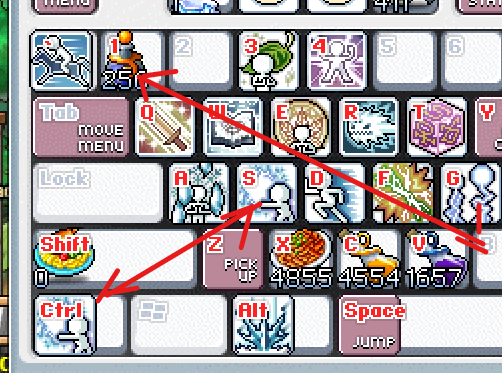
The Space Key is left justified,

Can it be Centre Justified, feels off

Same with Ctrl, Alt, and Shift

It would also be nice to allow Multiple Keys binds for potions, you can multi bind skills, but not options at the moment.
screenshot 1screenshot 2
🍅 ME TOO · 0 Sign in to confirm this bug.
COMMENTS 3 replies
Mark ADMIN 8 hr ago
Thanks Tai. We checked both points against the Pre-BB game. On the wide keys (Space, Ctrl, Alt, Shift) the original seats the icon at the left end of the key rather than the middle, so that part matches. The original also keeps an item on one key only: putting a potion on a second key takes it off the first. Both are as in the original game, so we are leaving them; the idea of one potion on several keys has been passed to Mark as a suggestion.
Mark ADMIN 4 hr ago
Update, Tai: Mark looked at this again and both of your ideas are in. Open Keyboard Setting and drag a potion from your Item window onto a key, then drag the same potion from the Item window onto another key. It now stays on both, and every key shows the same count and drinks from the same stack. Dragging a potion from one key to another still moves it, and dragging it off the keyboard (or right-clicking the key) clears just that key. Press OK to keep the changes. Pre-BB only allowed one key per item, so this is a house change made on your suggestion. The pictures on Space, Ctrl, Alt and Shift now sit in the middle of the key too. One note: skills still live on one key each, as before. Let us know how it feels.
Mark ADMIN 3 hr ago
One more for you, Tai: Mark has opened this up further. Skills can now sit on more than one key as well. Drag the same skill from your Skill window onto a second key and it stays on both; dragging from one key to another still moves it. The pictures on Tab, Caps Lock, Enter and Backspace now sit in the middle of the key too, like Space, Ctrl, Alt and Shift.

Sign in with MSU to comment.