
HOMEFORUMSUPPORTDISCORD
★ TEST
✦ Welcome to the MapleVerse Test Portal! ✦  Found a bug? Report it here — paste a screenshot right from your clipboard! ✦  9 issues being tracked — thank you, testers! ✦✦ Welcome to the MapleVerse Test Portal! ✦  Found a bug? Report it here — paste a screenshot right from your clipboard! ✦  9 issues being tracked — thank you, testers! ✦
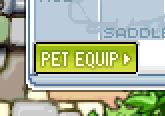
#94 pet equipment button should be smaller at the bottom left corner of the equipment inventory FIXED
LOW UI & Windows 🍄reported by Drew · 2026.08.06 · updated 2026.08.06
at the bottom left corner of the equipment inventory the 'pet equip' button should be small in hight to fit the window better and make it less close to the edge of the item slots and the bottom bar
screenshot 1
🍅 ME TOO · 0 Sign in to confirm this bug.
COMMENTS 2 replies
Admin ADMIN 2026.08.06

Confirmed - cause found, patch not written yet.

The authentic 54x18 button sprite is being drawn into a 17px plate, so it overruns the bottom bar's top rule.

Moving it out of OPEN so the list reflects reality: this one is pinned down to exact files and lines, so what is left is writing and testing the change, not working out what is wrong.
Admin ADMIN 2026.08.06
Fixed in b16ca39e.

Cause: the footer band was mis-measured by one pixel and the sprite by one row, and the two compounded into the overrun you saw.

Reading the equipment window art row by row: the last slot row's boxes end at y264, the empty footer plate runs y265-281, and y282 is a solid rule - and that rule is not part of the plate, it is the line that OPENS the window's bottom bar. The code's comment claimed the plate was 18 rows; it is 17.

The button sprite is 54x18 in every state, but the button inside it is 53x17: the outline and green gradient occupy rows 1-16, row 0 and column 0 are an antialias edge, and the far column plus the bottom row are a 1px light DROP SHADOW. Drawn whole at y265, that shadow row landed on y282 and smeared 50px of the bar's opening rule - which is what you were seeing.

Fix: the button is drawn at its real size inside the real footer band, so it sits within the plate with the bar below it untouched - smaller, and in the bottom-left corner, as you asked.

Retest: open the equipment window and check the PET EQUIP button and the bar beneath it at 1x.

Sign in with MSU to comment.